About WiFi Hotspot: Auto-Off Manager
Tired of draining your battery because you forgot the mobile hotspot was on? WiFi Hotspot Manager automatically turns off your mobile hotspot when time, data, or battery limits are reached — saving data and battery...
Tired of draining your battery because you forgot the mobile hotspot was on? WiFi Hotspot Manager automatically turns off your mobile hotspot when time, data, or battery limits are reached — saving data and battery without lifting a finger.
Control your mobile WiFi hotspot with powerful tools including Smart Auto-Off, a built-in hotspot timer, hotspot data tracking, session history, speed testing, WiFi QR sharing, widgets and tethering shortcuts — all from one easy-to-use dashboard. No root required.
🔥 Mobile Hotspot Dashboard
Manage your mobile hotspot activity from a single screen.
• View hotspot status instantly
• Monitor current session activity
• Access hotspot tools quickly
• Launch Android hotspot settings with one tap
🔋 Smart Auto-Off & Hotspot Timer
Stop unnecessary battery drain and mobile data overuse.
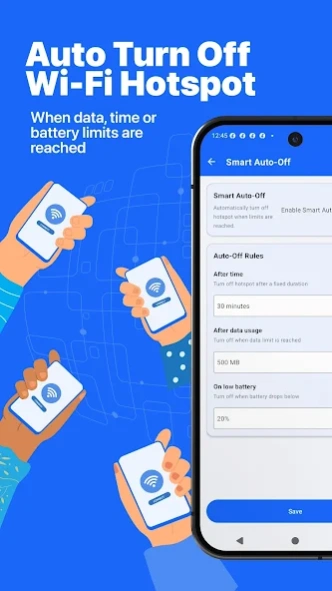
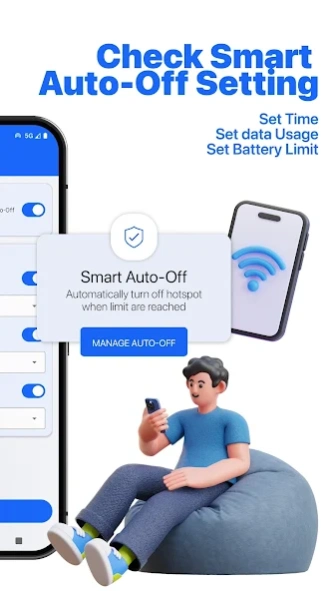
Set a hotspot timer to automatically turn off your hotspot when:
• A time limit is reached
• A data usage limit is reached
• Battery level drops below your selected threshold
No need to remember to turn it off — the hotspot timer handles it for you.
Perfect for protecting battery life while sharing internet.
📊 Hotspot Data Usage Monitor
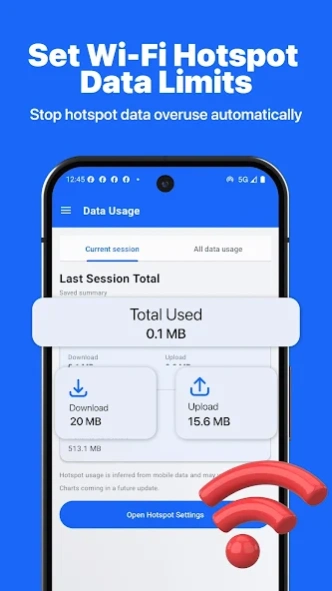
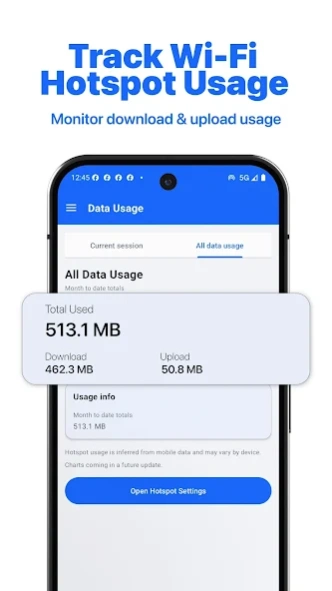
Track hotspot usage in real time.
• Download and upload tracking
• Current session statistics
• Total hotspot usage monitoring
• Data limit management
• Usage summaries
Know exactly how much hotspot data is being consumed.
📅 Hotspot Session History
Review your hotspot activity anytime.
• Session date and time
• Usage duration
• Download and upload totals
• Historical records
Great for monitoring hotspot usage patterns over time.
📱 Home Screen Widgets
Control your hotspot directly from your home screen.
Compact Widget:
• Hotspot status
• Session usage summary
Detailed Widget:
• Smart Auto-Off countdown
• Download and upload statistics
• Live hotspot information
No need to open the app.
🚀 Internet Speed Test
Measure your connection performance.
• Download speed
• Upload speed
• Ping
• Jitter
• Live performance graphs
Verify your internet speed before sharing your hotspot.
🔐 WiFi QR Sharing
Share WiFi access quickly and securely.
• Generate WiFi QR codes
• Easy hotspot sharing
• No password typing required
🛠 Hotspot Tools
Useful utilities for hotspot and tethering management.
• USB tethering shortcuts
• Bluetooth tethering shortcuts
• Nearby WiFi tools
• Android settings shortcuts
• Connection management tools
Why Use WiFi Hotspot Manager?
✓ Smart hotspot automation
✓ Battery-saving controls
✓ Data usage monitoring
✓ Session history tracking
✓ Home screen widgets
✓ Speed testing
✓ QR code sharing
✓ No root required
Important Notes
• This app works with official Android hotspot functionality.
• Some features depend on Android version and device manufacturer.
• Mobile carrier data charges may apply.
• Hotspot availability depends on your carrier and device support.
If you enjoy WiFi Hotspot Manager, please leave a review and help us improve the app.
Previous Versions
Here you can find the changelog of WiFi Hotspot: Auto-Off Manager since it was posted on our website on 2016-12-25 19:08:44.
The latest version is 5.0.8 and it was updated on 2026-10-12 17:15:22. See below the changes in each version.
WiFi Hotspot: Auto-Off Manager version 5.0.8
Updated At: 2026-07-05
Changes: New in Mobile WiFi Hotspot: Network Scanner lets you see every device on your network and alerts you to unknown connections. Wifi Security instantly checks your network for weak encryption, DNS tampering, and MITM risks, so you know if it's safe. Also fixed a Speed Test error caused by a server redirect issue. Update now for a safer, smarter hotspot experience!
WiFi Hotspot: Auto-Off Manager version 5.0.6
Updated At: 2026-06-20
Changes: Smarter hotspot control is here!
• Smart Auto-Off: stop your mobile hotspot automatically by time, data, or battery
• Home screen widgets: see status, data used & time left at a glance
• Session History: track every hotspot session and battery impact
• Data Usage: live mobile + monthly totals
• Share WiFi instantly with a QR code
• Built-in internet speed test
Faster, lighter, and more reliable. Thanks for using Mobile Wifi Hotspot!
WiFi Hotspot: Auto-Off Manager version 5.0.5
Updated At: 2026-06-03
Changes: v5.0.5 — Biggest update yet! 🚀
✨ What's new:
- Session History — review every hotspot session by date, time & data used
- Home Screen Widget — control your hotspot without opening the app
- Smart Auto-Off — auto-disable hotspot by timer, data or battery limit
- New Tools tab — tethering, QR sharing & settings in one place
- Redesigned bottom navigation for effortless one-handed use
- Smoother performance & crash fixes
WiFi Hotspot: Auto-Off Manager version 5.0.4
Updated At: 2026-04-25
Changes: Your hotspot finally got a home screen widget. It now shows your data, speed and auto-off timer without you lifting a finger. 📱
New widgets, smarter auto-off, faster hotspot control, lighter app — all in one update.
🔹 Hotspot widget — live data & countdown on your wallpaper
🔹 Auto-off timer — hotspot turns off automatically
🔹 Speed test fixed — stable on all devices
🔹 25 MB lighter — faster cold starts
WiFi Hotspot: Auto-Off Manager version 5.0.3
Updated At: 2026-02-17
Changes: v5.0.3 (aka “Wifi Hotspot Glow-Up”)
• Dashboard got a makeover: cleaner, faster, less chaos.
• Smart Auto-Off got smarter: time/data/battery rules + improved save behavior.
• Hotspot won’t turn off? We now guide you to system settings like a polite bodyguard.
• New Notifications Center: grouped timeline, filters, and in-app history.
• Major bug fixes and Android 16+ stability improvements.
WiFi Hotspot: Auto-Off Manager version 5.0.0
Updated At: 2026-02-14
Changes: v5.0.0 (aka “Hotspot Glow-Up”)
• Dashboard got a makeover: cleaner, faster, less chaos.
• Smart Auto-Off got smarter: time/data/battery rules + improved save behavior.
• Hotspot won’t turn off? We now guide you to system settings like a polite bodyguard.
• New Notifications Center: grouped timeline, filters, and in-app history.
• Major bug fixes and Android 14+ stability improvements.
WiFi Hotspot: Auto-Off Manager version 4.6.0
Updated At: 2025-11-19
Changes: Upgraded to Android 16! 🚀 Improved Wi-Fi Hotspot connectivity and made Wi-Fi sharing smoother than ever. Your hotspot is now less moody and more ready to mingle.
WiFi Hotspot: Auto-Off Manager version 4.5.5
Updated At: 2025-03-16
Changes: Fixed Wi-Fi Hotspot Connectivity on Android 15 and Added Wi-Fi Repeater
WiFi Hotspot: Auto-Off Manager version 4.5.2
Updated At: 2024-07-17
Changes: Fixed Hotspot Connectivity on Android 14 and Added Wifi Repeater
WiFi Hotspot: Auto-Off Manager version 4.4.0
Updated At: 2024-06-18
Changes: Wifi Hotspot Router now support Android 14
Bug Fixed
Disclaimer
Official Google Play Link
We do not host WiFi Hotspot: Auto-Off Manager on our servers. We did not scan it for viruses, adware, spyware or other type of malware. This app is hosted by Google and passed their terms and conditions to be listed there. We recommend caution when installing it.
The Google Play link for WiFi Hotspot: Auto-Off Manager is provided to you by apps112.com without any warranties, representations or guarantees of any kind, so access it at your own risk.
If you have questions regarding this particular app contact the publisher directly. For questions about the functionalities of apps112.com contact us.